Reading legacy code to harmonize Ruby and Rails code loaders
Presented at Austin.rb in February 2015
Abstract
Metasploit Framework is a tool for developing and executing exploits code against remote target machines. Metasploit Framework was created in 2003 in Perl and was finished converting to Ruby in 2007. Due to its age, Metasploit Framework predates a lot of the tools and practices we take for granted like bundler, standard gem layout12, unit testing with rspec, documenting with YARD, and continuous integration. In August 2012, I joined Rapid7 to work on Metasploit, and my first task was to allow compatibility between Metasploit Framework’s dynamic code loading of Metasploit Modules and the dynamic code loading used in Rails: ActiveSupport::Dependencies. In order to make the non-Rails Metasploit Framework and Rails Metasploit Pro loading compatible, I had to read and understand the Metasploit Modules loader when there were no tests; there were no docs; and the specifications were locked in people heads as tribal knowledge. I also had to read ActiveSupport::Dependencies to understand what hidden preconditions it had on code it loaded. Integrating this knowledge, I was able to make the Metasploit Module loader compatible by dynamically assigning deterministic namespace names to the loaded Metasploit Modules.
- Abstract
- Background
- Outline
- Motivation
- Methods
- The search for the
set_autoload_pathsinitializer - Metasploit Module Loader compatibility with ActiveSupport::Dependencies
- Refactoring to ease understanding
- When refactoring introduces you to lexical scope
- The search for the
- Review
- Acknowledgements
- Links
Background
Code-Loading in Ruby
Ruby has 3 primary ways to load code in the standard library:
loadrequireautoload
All three search for files in the load path, which is an array of String representing directories under which relative paths can be resolved. (If an absolute path is given then it is loaded directly without checking under directories in the load path.) The current load path can be accessed in the $: variable or the less cryptic $LOAD_PATH variable.
load
load is the lowest level of the code loading methods. It will resolve relative paths in $LOAD_PATH, but it won’t automatically add on the .rb extension for you (or .dll, .so, or .dylib for C extensions). load will also reload files that have already been loaded, which is a good thing if you want to reload code in development but a bad thing if you’re trying to be efficient when starting up a slow application that has multiple ways for a file to be required.
require
require is a little higher level than load. It will automatically add the .rb extension and any extensions your system uses for the C language like .dll on Windows, .so on Linux, or .dylib on OS X. This has the benefit of your code not needing to know whether you’re using a pure Ruby library with a .rb extension or C extension library with a different extension. This power of require is what allows you to use C-extension gems in your bundle without having to change all your require statements. require also has the nice benefit that it’s thread-safe due a lock used in the Ruby VM while load is not thread-safe.
require_relative
Related to require, require_relative ignores $LOAD_PATH and instead uses __FILE__, the path of the current file, to load other files. Use of require_relative should be seen as a code smell that a project has not properly setup its $LOAD_PATH, such as in gems when the gemspec does not add the project’s lib to $LOAD_PATH.
autoload
load and require both have a downside: as soon as they are encountered, they load the code. This means you have to wait for all the libraries you might use, even if they’re not used for a given run of your program. If you want to only load the code you actually use, use autoload. It takes a relative constant name, such as a Class or Module name, and the path of the file to load:
# lib/parent.rb
module Parent
  autoload :Child, 'parent/child'
end

# lib/parent/child.rb
module Parent::Child
end
When Parent::Child is accessed for the first time, parent/child will be loaded. In Ruby 1.9.3, this loading will happen once but is not thread-safe; in Ruby 2.0+ this loading will happen once but is
thread-safe and can be thought of as just an on-use require as autoload uses the same VM lock as require in MRI Ruby 2.0+.
Code-Loading in Rails
Part of Rails’ “Convention over Configuration”, is that namespace Modules should correspond to directories while code Modules and Classes should correspond to files under the namespace directories.
ActiveSupport::Autoload
When following this convention, you can use ActiveSupport::Autoload to remove the need to specify the path to autoload:
# lib/parent.rb
module Parent
  extend ActiveSupport::Autoload

  autoload :Child
end
ActiveSupport::Dependencies.autoload_paths
But, it turns out that this isn’t the convention for Rails apps because autoload, like require loads a file once and then the file can’t be reloaded, so Rails came up with config.autoload_paths, which configures ActiveSupport::Dependencies.autoload_paths. ActiveSupport::Dependencies.autoload_paths has the benefit over autoload in that it can either use load, to allow reload, such as in development, when you don’t want to have to restart your web server to see your code changes, or require in production when you want all your code loaded once so forks can share the memory. ActiveSupport::Dependencies.autoload_paths also means you configure the autoload on an entire path and don’t have to add extend ActiveSupport::Autoload and autoload <child> to each namespace Module, which removes more “Configuration” from your code thanks to using the Rails “Convention”. Even when using require, ActiveSupport::Dependencies.autoload_paths is not thread-safe because it uses const_missing to trigger the require and const_missing is not protected by the VM lock.
Code-loading in Ruby and Rails feature comparison
| Loader | Extension Required | Loads Only Once | Thread-safe |
|---|---|---|---|
| Kernel.load | Yes | No | No |
| Kernel.require | No | Yes | Yes |
| Kernel.autoload | No | Yes | No (1.9) / Yes (2.0+) |
| ActiveSupport::Autoload#autoload | No | Yes | No (1.9) / Yes (2.0+) |
| ActiveSupport::Dependencies#autoload_paths | No | Either | No |
Outline
In August 2012, metasploit-framework was 9 years old with 5 years in Ruby. The Metasploit Rails application used for Metasploit Community, Express and Pro (hereafter referred to as Metasploit Pro) was 2 years old and on Rails 3.2.2. Over a few weeks I moved the code base from a mix of require and ActiveSupport::Dependencies in Pro to using ActiveSupport::Dependencies and along the way I had to rewrite the Metasploit Framework Module loader, which used a form of code loading I didn’t even mention in the background. Along the way I learned about anonymous modules, how ActiveSupport::Dependencies works internally, and how lexical scope affects constant resolution in Ruby.
Motivation
When developing Rails application, it is convention to skip explicit requires or even to use Kernel.autoload and instead use config.autoload_paths to load app/models and it’s a common “house rule” to also add lib to config.autoload_paths. Since Rails convention maps namespaces to directories and Modules/Classes to file names under those namespace directories, the project layout convention meshes with config.autoload_paths to eliminate the need for predictable require paths. config.autoload_paths also is what allows for code reloading in development mode.
The Metasploit Rails application (Metasploit Pro) was composed of a Rails application (UI) that automatically had access to the Rails autoload_paths and a non-Rails background process, prosvc (“pro service”), which had to manually load all the models and libraries that
were shared between the UI and prosvc. This duplicative, but different way of loading code had led to missing explicit requires in prosvc. Additionally, the requires were very messy due to the selective nature of there requires. The requires were selective to speed up load times in prosvc, which already took over a minute to boot.
Methods
The search for the set_autoload_paths initializer
To harmonizing the code loading process between UI and prosvc, I wanted to set config.autoload_paths, in prosvc, but without a full Rails application since prosvc wasn’t a Rails application.
From the configuring guide for Rails 3.2.2, which was the version of Rails used by Metasploit Pro at the time, I knew config.autoload_paths were added to ActiveSupport::Dependencies.autoload_paths in the set_autoload_paths initializer, but from the guide, I didn’t know where set_autoload_paths is, so I had to look at it’s source to see if I could use the initializer without Rails or copy what it’s doing to work with just ActiveSupport.

I knew Rails depended on a bunch of gems like active_support and active_record, but I wasn’t sure which gem contained the initializers, so I went to https://rubygems.org and search for rails. On the rails page I clicked Show all versions. And searched for 3.2.2. On the page for 3.2.2. Here’s what I knew about the dependencies:
| Gem | Purpose |
|---|---|
| actionmailer | sending mail |
| activerecord | database records |
| activeresource | non-database records |
| bundler | dependency management |
| actionpack | ? |
| activesupport | ? |
| railties | ? |
This left actionpack, activesupport, or railties as the location of set_autoload_paths. I needed to look at and search the source, but the rubygems pages for actionpack, activesupport, and railties had no “Source Code” link, so I went back to the rails gem page and clicked its “Source Code” link. Looking at the directory listing, I saw directories for actionpack, activesupport, and railties, so I assumed that all the gems were just housed in this same repository. I needed to search against a specific tag of the repository and not how the code looks in master, so I cloned the repo to search locally
cd ~/git
mkdir rails
cd rails
git clone git@github.com:rails/rails.git
cd rails
I searched for set_autoload_path using ack, which is a nicer alternative to grep:
git checkout v3.2.2
ack set_autoload_paths
I saw only 2 results

railties/lib/rails/engine.rb line 536 looks like a DSL call for setting up an initializer, so I opened ~/git/rails/rails/railties in Rubymine to take advantage of its ability to jump from definition and usage easier than vim. I did Shift+Shift and typed engine.rb and hit enter to open the file. I did :536 to jump to line 536 because I use IDEAVim to have vim bindings in Rubymine.
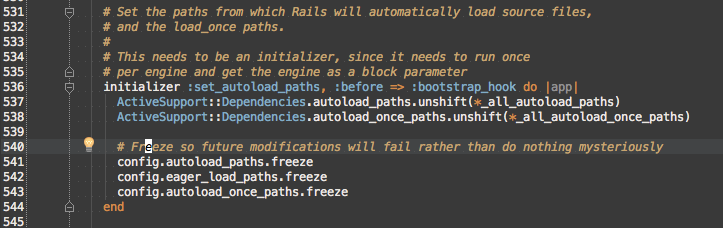
set_autoload_paths implementation
I see ActiveSupport::Dependencies.autoload_paths being added to with unshift, but I don’t see config.autoload_paths being read except for the config.autoload_paths.freeze on line 541, so I Cmd+Click _all_autoload_paths to see it’s definition.

_all_autoload_paths is just the combination of config.autoload_paths, config.eager_load_paths, and config.autoload_once_paths, so if all I care about is emulating set_autoload_paths is I need to do ActiveSupport::Dependencies.autoload_paths.unshift(config.autoload_paths), which is what I ended up doing in the PR. Looking at the other lines in set_autoload_paths, I’ll want to freeze my paths to prevent future modifications.
Emulating initializers without Rails::Engine
So, that takes care of what my set_autoload_paths should do, but how am I going to get prosvc to do it without Rails::Engine? I need to look more at how Rails::Engines works to see which pieces I should copy to mimic its path handling from boot to set_autoload_paths. I know that initializers are run in the order they are defined except where :before or :after would override that order from the configuring guide.

This means, to understand everything that happens before set_autoload_paths, I can just start by reading the code before it. The only initializer I see is set_load_paths, which uses _all_load_paths instead of the _all_autoload_paths from set_autoload_paths.

From the naming scheme, I’d assume that _all_load_paths is a superset of _all_autoload_paths because there’s no auto in its name, but to confirm, I CMD+Click _all_load_paths to see its definition:

So, _all_load_paths → _all_autoload_paths, which means that any autoload path must be added as a normal load path and I should port set_load_paths in addition to set_autoload_paths. I can ignore config.paths.load_paths because from the current prosvc, I know I only want to load lib, app/models, and app/uploaders from pro/ui.
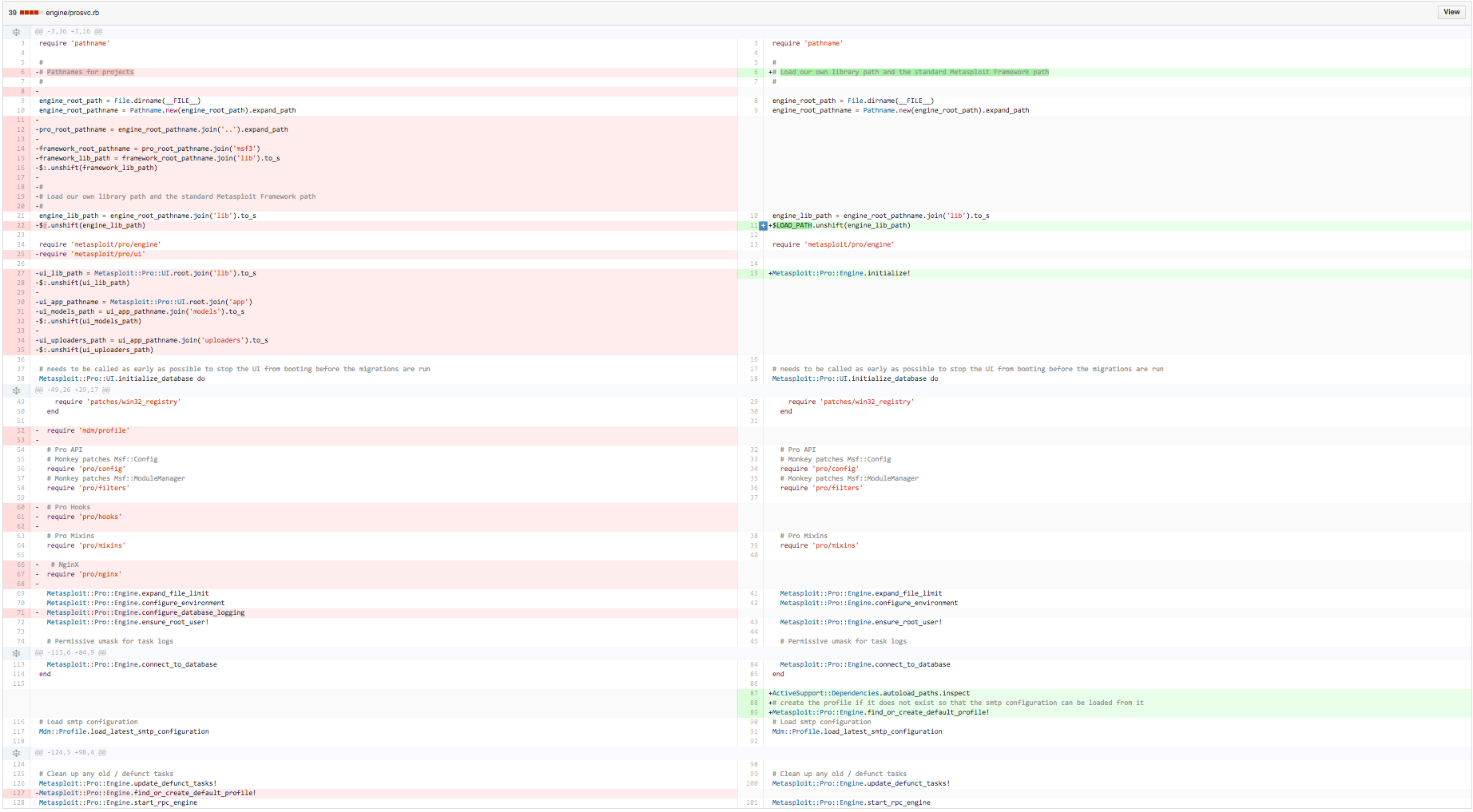
Separating initializers and configuration
Looking at the structure for the Rails code, I can see that the initializers are kept in Rails::Engine, which can be used across all engines, while the customization of the paths is in Rails::Engine::Configuration, so I adopt a similar pattern, with Metasploit::Configured being equivalent to Rails::Engine and Metasploit::Configuration being equivalent to Rails::Engine::Configuration.
With the structure derived from rails, I now need to apply it to the paths being used by prosvc.
Looking at the requires in prosvc
Fake Rails::Engines
I can see there are 3 roots from which files are being loaded: msf3, which is a symlink to metasploit-framework, ui, and the engine, which is the directory prosvc is in. Metasploit Framework works on its own without the need for pro/ui or pro/engine, so it can be thought of as a Rails::Engine. Likewise, pro/ui works without using pro/engine directly, so it too could be a Rails::Engine. With msf3 and ui being modeled as a an engine, it just makes sense to treat engine as a Rails::Engine too, so each directory will have a corresponding namespace and Metasploit::Configuration subclass so I setup the paths, such as lib, and app/models that need to be autoloaded for prosvc as a whole to work.
Metasploit::Framework::Configuration sets up msf3/lib and msf3/lib/base as autoload paths. Metasploit::Pro::Engine::Configuration sets up engine/lib as an autoload path. Metasploit::Pro::UI::Configuration sets up ui/lib, ui/app/controllers, ui/app/uploaders, and ui/app/models as autoload paths.
Testing with Metasploit Module Loader
The build process was complicated at the time,
Build metasploit_data_models 0.0.2.43DEV for pro:
cd ~/git/rapid7
git clone git@rapid7.github.com:rapid7/metasploit_data_models.git
cd metasploit_data_models
git checkout dd6c3a3
gem build metasploit_data_models_live.gemspec
Build prototype_legacy_helper for pro:
cd ~/git
mkdir jvennix-r7
cd jvennix-r7
git clone git@rapid7.github.com:jvennix-r7/prototype_legacy_helper.git
cd prototype_legacy_helper
vim prototype_legacy_helper.gemspec
I don’t remember how prototype_legacy_helper was actually built and installed for production, so let’s just use a fake gemspec:
# coding: utf-8
lib = File.expand_path('../lib', __FILE__)

Gem::Specification.new do |spec|
  spec.name          = "prototype_legacy_helper"
  spec.version       = "0.0.0"
  spec.authors       = [""]
  spec.email         = [""]
  spec.summary       = ""
  spec.description   = ""
  spec.homepage      = ""
  spec.license       = "MIT"

  spec.files         = `git ls-files -z`.split("\x0")
  spec.executables   = spec.files.grep(%r{^bin/}) { |f| File.basename(f) }
  spec.test_files    = spec.files.grep(%r{^(test|spec|features)/})
  spec.require_paths = ["lib"]

  spec.add_development_dependency "bundler", "~> 1.7"
  spec.add_development_dependency "rake", "~> 10.0"
end
Build the gem
gem build prototype_legacy_helper.gemspecRewind pro and metasploit-framework to commits where pro had ActiveSupport::Dependencies, but framework was still incompatible. (NOTE: this state is simulated. When it happened, framework was updated first before pro was committed, but this state did occur on my dev machine while working on this change.)
cd ~/git/rapid7
git clone git@rapid7.github.com:rapid7/pro.git
cd pro
git checkout  3370204
rm msf3
ln -s ~/git/rapid7/metasploit-framework ms3
cd msf3
git checkout 8b8da0b
cd ..
cd ui
rvm use ruby-1.9.3@pro
edit Gemfile
# Comment out therubyracer.  The locked version can't be built against modern Yosemite
RAILS_ENV=development bundle install
So, everything loads using autoload paths and Metasploit Pro developers no longer have to worry about forgetting to add requires to prosvc to shared code between ui and engine, right? Trigger the need to autoload SocialEngineering using autoload_paths by removing the constant and then trying to use web_phish module that references SocialEngineering::Campaign. Nope, I get “wrong constant name” when trying to load certain modules for the searching:

Metasploit Module Loader compatibility with ActiveSupport::Dependencies
So, pull up activesupport-3.2.2/lib/active_support/inflector/methods.rb:229 to find out how “wrong constant name” is raised: In Rubymine, open ~/git/rails/rails/activesupport. Switch to tag v3.3.2. Shift+Shift lib/active_support/inflector/methods.rb. :229.

So, since the first line of the backtrace (/Users/luke.imhoff/.rvm/gems/ruby-1.9.3-p551@pro/gems/activesupport-3.2.2/lib/active_support/inflector/methods.rb:229:in 'const_defined?') mentioned const_defined?, I assume that const_defined? itself raised the exception and name is malformed. I’m assuming name is a String (and not a symbol or object that responds to #to_s) since it comes from names and names comes from camel_cased_word, which calls split, which looks like String#split. #<KLASS:HEX> is the MRI format for objects that don’t have an overridden #inspect method, so I need to figure out how constantize is being called on a Module that doesn’t define #inspect.
ActiveSupport::Inflector#constantize is a pure-function (it doesn’t use or modify self), so I need to just trace camel_cased_word back through the call stack.
ModuleConstMissing#const_missing
The next method is ModuleConstMissing#const_missing.
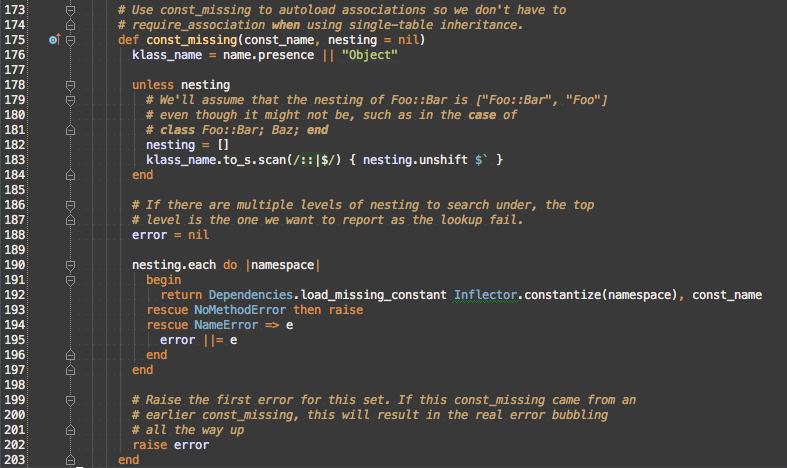
From line 192, we now know that the camel_case_word argument in ActiveSupport::Inspect#constantize is the namespace local here in ModuleConstMissing#const_missing. namespace is an element of nesting. nesting could either be passed in or derived from klass_name. const_missing is called implicitly by the Ruby VM since it’s not invoked explicitly in auxiliary/pro/social_engineering/web_phish.

This leaves the data flow for nesting being name → name.presence → klass_name → klass_name.to_s → klass_name.to_s.scan → nesting. The original messed up namespace, which was #<Module:0x0000010c916448> must be either the direct Module#name if Module#name contains no :: or be part of Module#name.
Debugging
I need to look at name, so I’m going to debug the call. Normally, I’d use Rubymine’s remote debugger, but at this time, Metasploit Pro had an issue where it loaded symlink paths instead of absolute paths, so ruby-debug-ide couldn’t register correct breakpoints, and pry and debugger aren’t available in the gemset that msfpro will use, so I’m stuck with print debugging.
vim ~/.rvm/gems/ruby-1.9.3-p551@pro/gems/activesupport-3.2.2/lib/active_support/dependencies.rb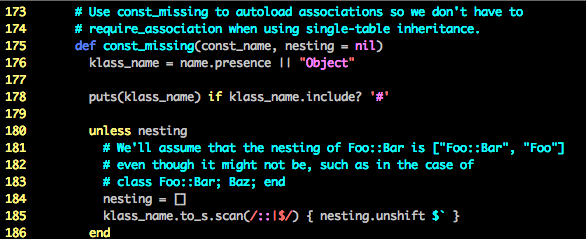
Let’s retry the reproduction steps:
cd ~/git/rapid7/pro/engine
RAILS_ENV=development ./msfpro
msf > irb
>> Object.send(:remove_const, :SocialEngineering)
>> exit
msf > use auxiliary/pro/social_engineering/web_phish
msf > set CAMPAIGN_ID 1
msf > run
Ok, so it’s a namespace Module for Metasploit3 and Metasploit3 happens to be the name of the class in auxiliary/pro/social_engineering/web_phish.
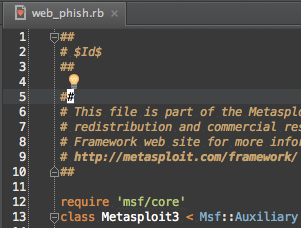
The MetasploitN class naming convention is used to indicate the minimum major version of Metasploit Framework required to run the module, so there are 100s of Metasploit3 and Metasploit4 classes.
Tracking anonymous Module creation
So, however use loads the Metasploit Module, it must introduce an anonymous Module (Module.new) that is used to prevent the Metasploit3 classes from colliding with each other. So, let’s look for Module.new in metasploit-framework/lib.
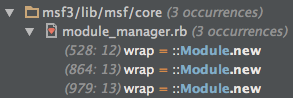
If I were declaring an anonymous Module to wrap something, wrap would be a good name, so let’s look at each of those.
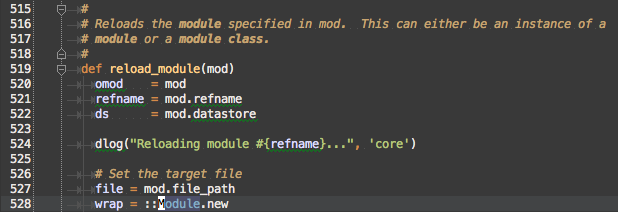
The first one is in Msf::ModuleManager#reload_module. It is unlikely that the only way to load modules is to use a function call reload, so moving on…
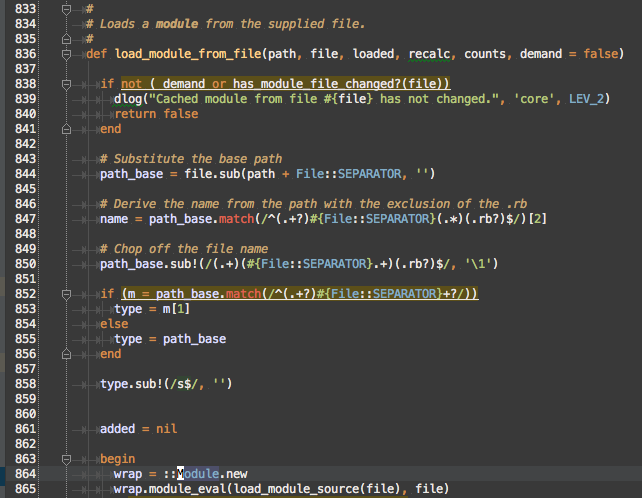
Msf::ModuleManager#load_module_from_file is probably the correct method, but let’s check the last line.
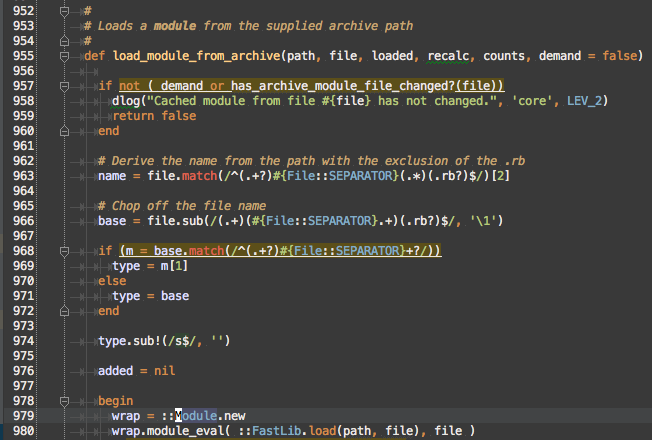
Huh, so Msf::ModuleManager#load_module_from_file and Msf::ModuleManager#load_module_from_archive look really similar, except one using Msf::ModuleManager#load_module_source and the other is using Fastlib.load. We’ll skip over what Fastlib is for now and stick with the Module.new in Msf::ModuleManager#load_module_from_path. We need to read all of Msf::ModuleManager#load_module_from_file to understand the context of the Module.new call on line 864.
De-anonymizing namespace Modules
The minimal change I can make to Msf::ModuleManager#load_module_from_file is that I replace the direct call to Module.new with a method that returns a named Module instead. Here’s the constraint this new method must fulfill from the code we’ve seen:
- The name must be unique, so that it prevents naming collision
- It needs to support reloading modules, so the name needs to be deterministic so that it can be replaced
Let’s look at the method I came up with

name when it comes in is / separated, such as auxiliary/pro/social_engineering/web_phish. I know from Rails that String#camelize in activesupport can be used to convert a path to a Module#name.

So, relative_module_name, is 'Auxiliary::Pro::SocialEngineering::WebPhish'

Because this now gives us a hierarchy of namespace modules, we need to ensure that each parent module is created before any child modules
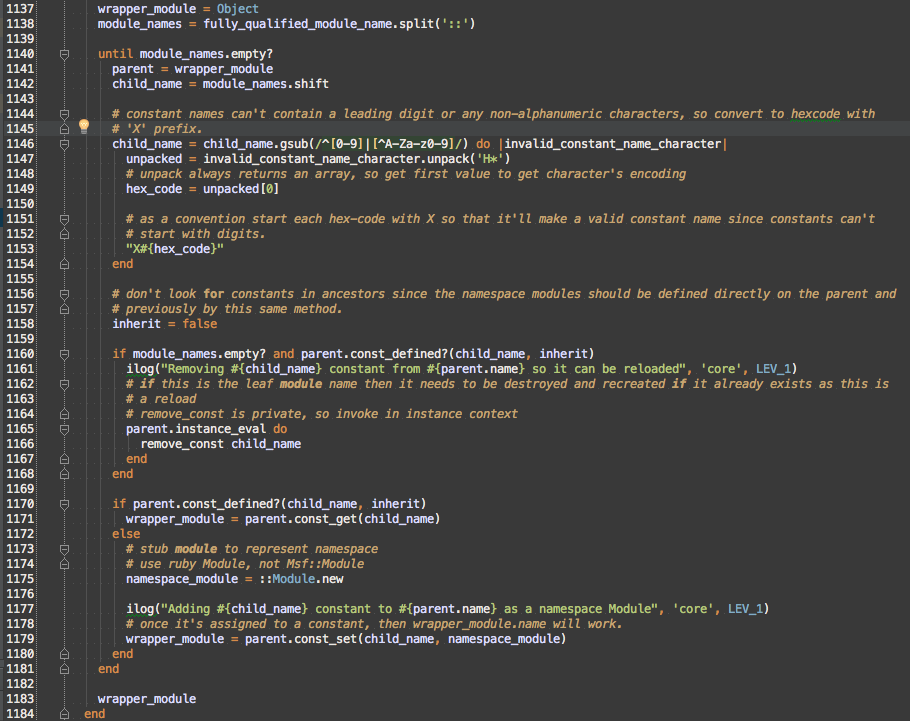
First, why am I starting with Object as the parent? Well, it’s because constant resolution always starts with Object.get_const, which I got from ModuleConstMissing#const_missing (https://github.com/rails/rails/blob/v3.2.2/activesupport/lib/active_support/dependencies.rb#L176)

until is to while as unless is to if, so this until loop is walking down the descendants until it gets to a leaf, which must be the wrapper_module that should be returned.
There are some slight complications that were encountered that weren’t in the original constraints: some modules have components of their name which are leading digits or non-alphanumeric characters, such as ‘-‘. To ensure a unique mapping, I hex encoded those illegal characters. Since hex encoding is reversible, I know it is a 1-to-1 mapping and will maintain the uniqueness of the original names. Hex encoding could return a digit again, which isn’t allowed in a Module name, so I have to prefix hex encoded characters with X

Module reloading is handled by removing the leaf constant if it already exists when the loop gets to it (module_names.empty? is true). false is passed to const_defined? to speed constant lookup and to prevent false positives from constants defined in ancestors.
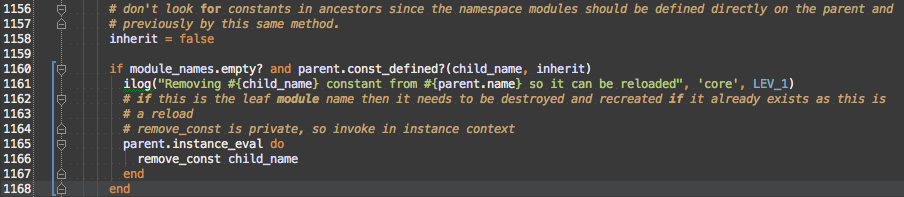
Walking down the tree is handled here
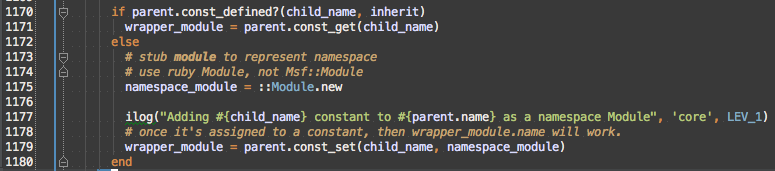
The if handles if we created this part of the hierarchy before, which would be the case during reload, but also for common parts of the Metasploit Module names like auxiliary/pro/social_engineering, which is used by multiple Metasploit Modules.

Finally we get back to creating an anonymous module. Prefixing a constant with :: tells Ruby to look up a constant starting at the top-level (Object) instead of the current lexical scope, which in this case is Msf, which contains Msf::Module.

So, if we didn’t pass the child_name to Module.new, how does it know it’s name? Well it’s turns out that the Ruby VM tells a Module it’s name the first time it’s associated with a constant, so setting the child_name constant on the parent namespace module will make the Module be named.

Refactoring to ease understanding
So, that fixed the anonymous module in Msf::ModuleManager#load_module_from_file, but remember, there were Module.new usages in Msf::ModuleManager#load_file_from_archive and Msf::ModuleManager#reload_module, so Msf::ModuleManager.wrapper_module needs to be used in those methods too. At this point, lib/msf/core/module_manager.rb, was 1189 lines long and it was difficult to keep track of the different pieces of Msf::ModuleManager, so I decided to break it up into more files.
One Class or Module per file
The first step is that lib/msf/core/module_manager.rb actually contained 2 classes, Msf::ModuleSet and Msf::ModuleManager
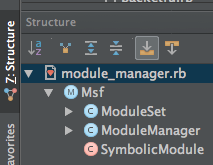
So, Msf::ModuleSet is moved to lib/msf/core/module_set.rb. (At the time, I didn’t want to address that lib/msf/core should be collapsed to just lib/msf since there is no Msf::Core namespace.) This drops lib/msf/core/module_manager.rb down to 839 lines
Grouping related methods into included Modules
Using the Structure view again, we see if there are any patterns in the name of methods:
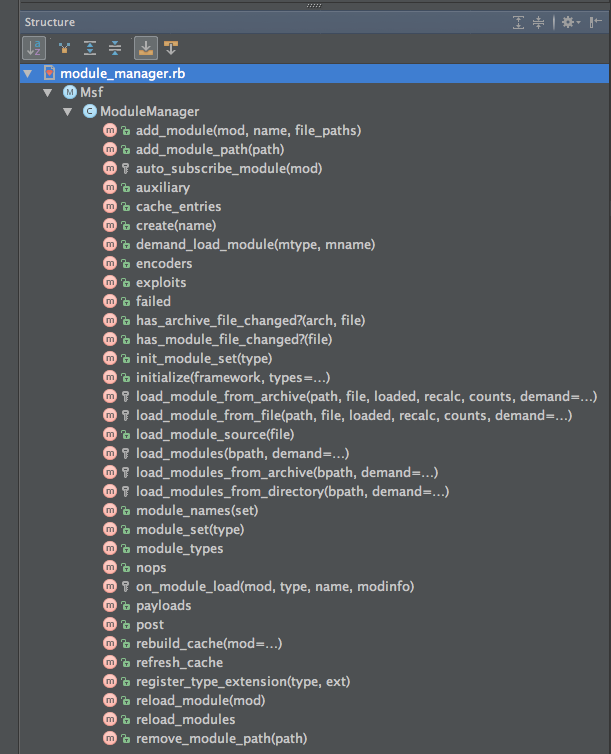
(NOTE: The methods aren’t this well organized. I purposely have alphabetical sorting turned on to make it easier to spot patterns.)
From the names it looks like there are the following categories:
- cache (
#cache_entires,#rebuild_cache,#refresh_cache) - creating
Msf::Moduleinstances (#create) - loading (
#demand_load_module,#failed,#has_archive_file_changed?,#has_module_file_changed?,#load_module_from_archive,#load_module_from_file,#load_module_source,#load_modules,#load_modules_from_archive,#load_modules_from_directory,#on_module_load) - module sets (
#auxiliary,#encoders,#exploits,#init_module_set,#module_names,#module_set,#module_types,#nops,#payloads,#post) - module paths (
#add_module_path,#remove_module_path) - reloading (
#reload_module,#reload_modules) - unknown (
#add_module,#auto_subscribe_module,#register_type_extension)
Unknowns
Let’s check the unknowns first before breaking out the other categories in case the unknowns belong in one of the pre-existing categories.
Msf::ModuleManager#add_module
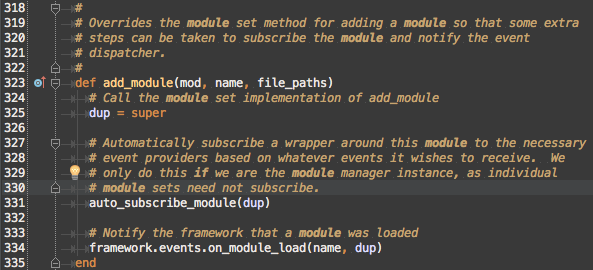
We can now see that #auto_subcribe_module should be grouped in the same category. It is likely that #add_module is related to loading since it calls framework.events.on_module_load, but to confirm let’s Find Usages
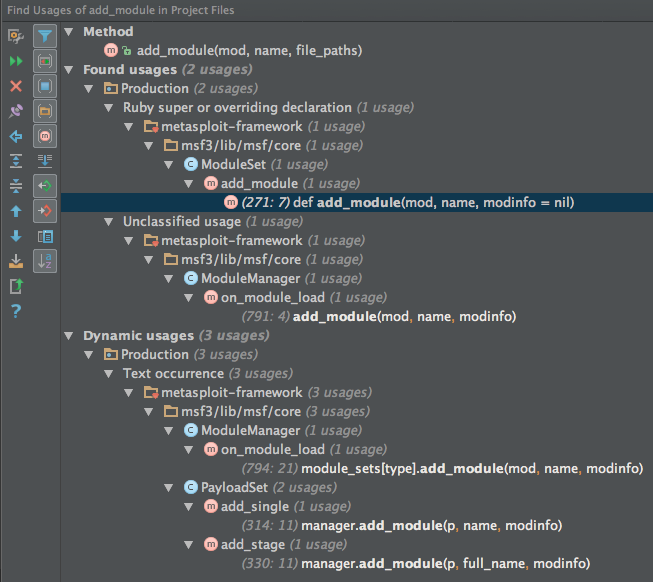
So, that confirms that it’s being used from Msf::ModuleManager#on_module_load, so #add_module and #auto_subscribe_module can go into the loading category.
Msf::ModuleManager#register_type_extension
This leaves #register_type_extension in the unknown category

This could either be dead code, or a method that is required to be defined by some interface that Msf::ModuleManager is supposed to support. Find Usages finds no usages, but just to be sure we’ll use a plain text search in case it’s being called with send and Rubymine can’t infer usage correctly.
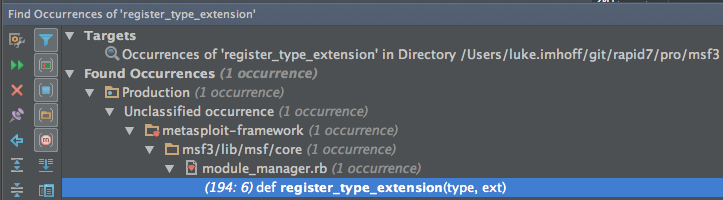
So, the definition is the only occurrence, so it’s dead code and can just be removed.
Extracting categories to included Modules
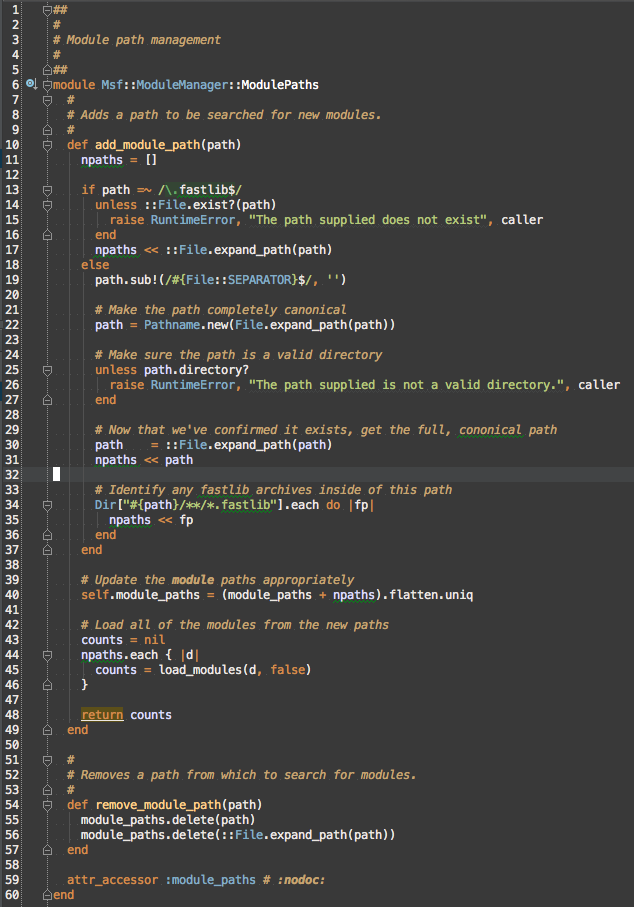
With the categories worked out the mixin extract can begin with the module paths category to Msf::ModuleManager::ModulePaths.
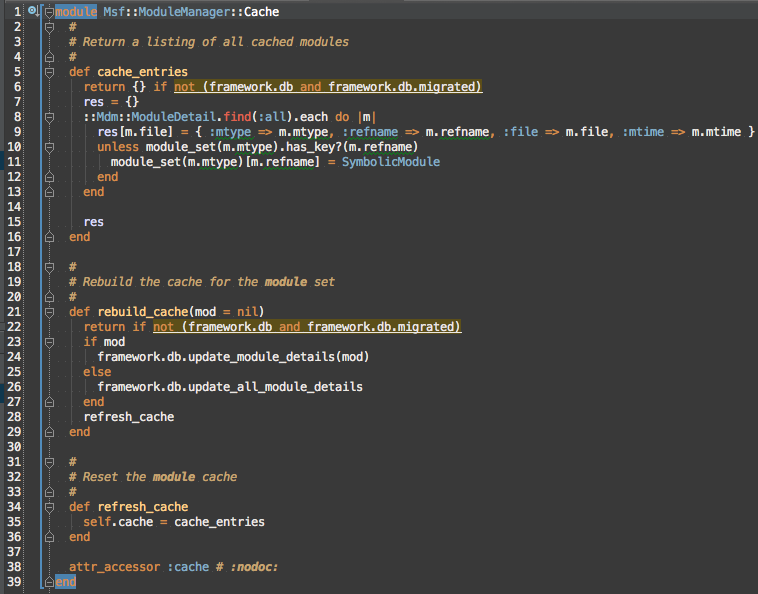
Doing the same for cache to Msf::ModuleManager::Cache.
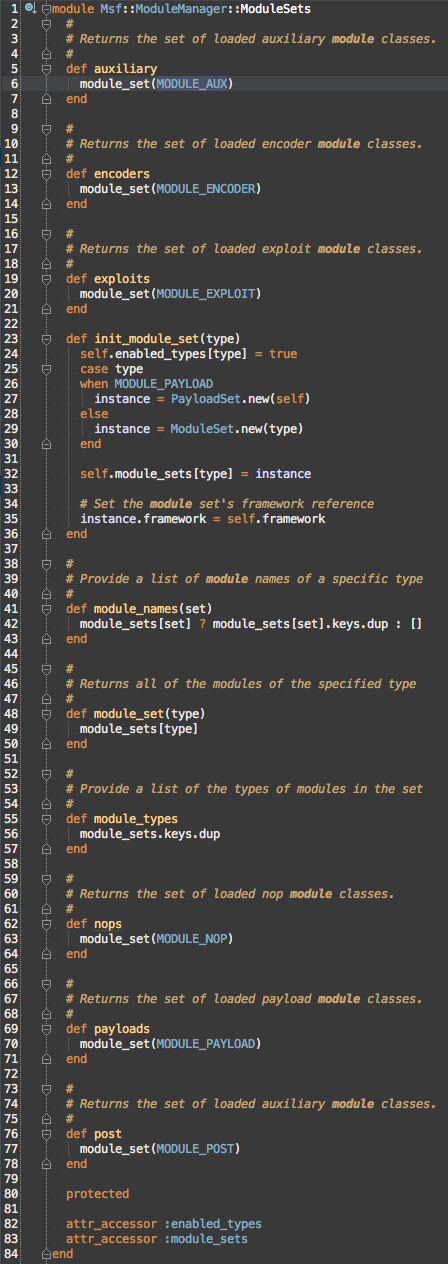
Module sets category to Msf::ModuleManager::ModuleSets
Reloading is extracted to Msf::ModuleManager::Reloading
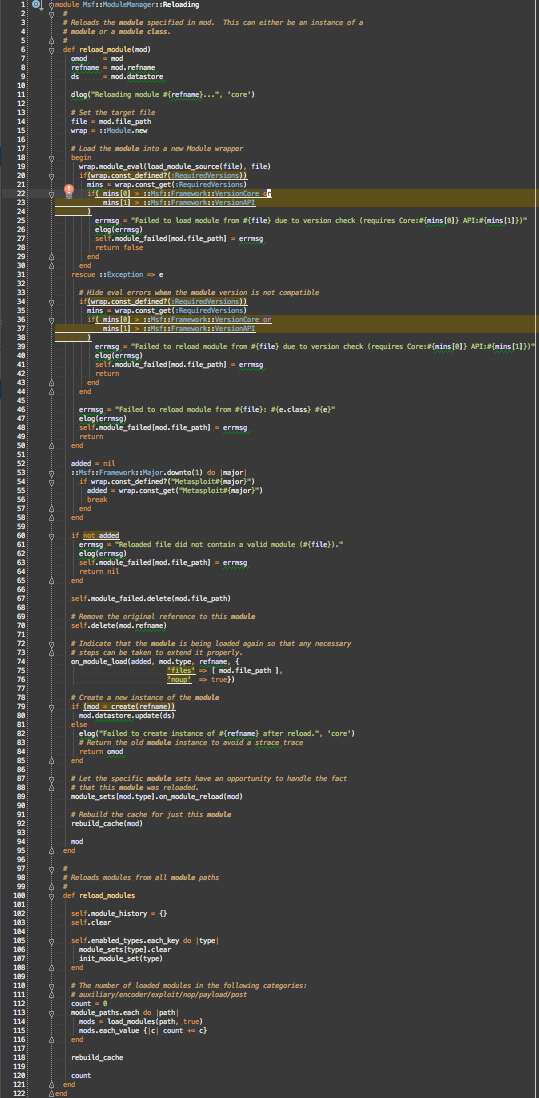
This leaves just the loading category for Msf::ModuleManager::Loading

Breaking up into Classes
Msf::ModuleManager::Loading is still too long at 466 lines and 13 methods
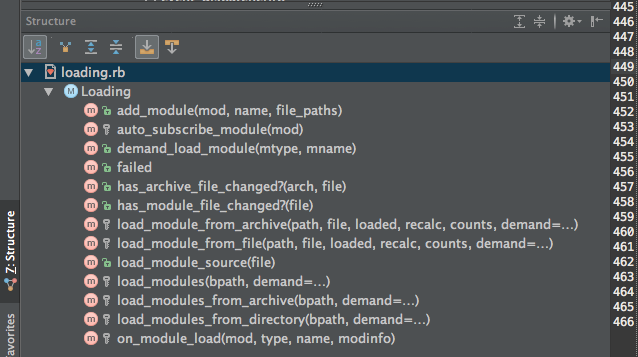
Let’s apply name pattern grouping again:
- file_changed? (
#has_archive_file_changed?,#has_module_file_changed?) - load_module (
#add_module,#auto_subscribe_module,#demand_load_module,#failed,#load_module_from_archive,#load_module_from_file,#load_module_source,#on_module_load) - load_modules (
#load_modules,#load_modules_from_archive,#load_modules_from_directory)
Look at the categories, there’s another way to group the methods:
- archive (
#has_archive_file_changed?,#load_module_from_archive,#load_modules_from_archive) - common (
#add_module,#auto_subscribe_module,#demand_load_module,#failed,#load_modules,#on_module_load) - directory (
#has_module_file_changed?,#load_module_from_file,#load_module_source,#load_modules_from_directory)
Matching up the archived and unarchive methods we see that they follow a naming convention
| Category | #file_changed? |
#load_module |
#load_source |
#load_modules |
|---|---|---|---|---|
| archive | #has_archive_file_changed? |
#load_module_from_archive |
Fastlib.load |
#load_modules_from_archive |
| directory | #has_module_file_changed? |
#load_module_from_file |
#load_module_source |
#load_modules_from_directory |
This pattern of common methods with specialization for archive and directory that follow the same naming convention would indicate that a class hierarchy with the common methods in the base class and archive and directory as sibling subclasses would be ideal. Since this will be transitioning the code from mixed in Modules in Msf::ModuleManager to two Msf::Modules::Loader classes, we’ll also need to add code to instantiate the loaders and dispatch to the appropriate load based on whether the module is in an archive or directory.
Separating Msf::ModuleManager::Loading and Msf::Modules::Loader::Base
Let’s read the common methods first to verify whether they should go in the new Msf::Modules::Loader::Base or stay in Msf::ModuleManager::Loading based on whether they are helping to load the module or updating the state of the Msf::ModuleManager based on a module being loaded.
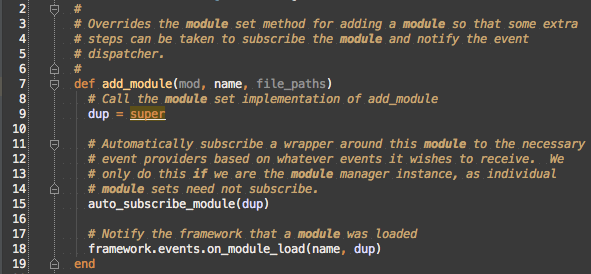
The comments make references to the method being an override of Msf::ModuleSet#add_module, so the method should remain in Msf::ModuleManager::Loading and not move to Msf::Modules::Loader::Base. This also means that #auto_subscribe_module should stay in Msf::ModuleManager::Loading due to #add_module’s references to those methods.
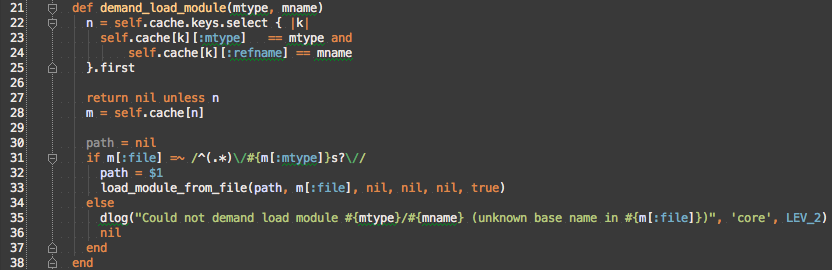
#demand_load_module calls #load_module_from_file, which would indicate that it should actually be grouped into the directory category, but this is actually a bug in the code where all features of the directory category were not mirrored to the archive category. Instead of focusing on the called methods, let’s use Find Usages to look at the callers of #demand_load_module.
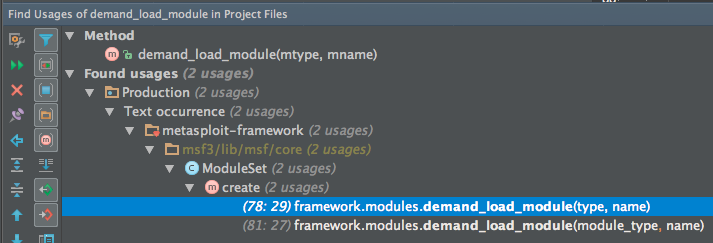
Since #demand_load_module is only used by Msf::ModuleSet#create and by calling it directly on framework.modules, which is an instance of Msf::ModuleManager, #demand_load_module should remain in Msf::ModuleManager::Loading.
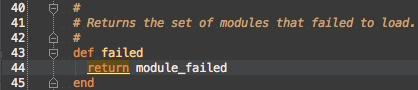
#failed just references the attribute module_failed, so use Find Usage to do caller analysis
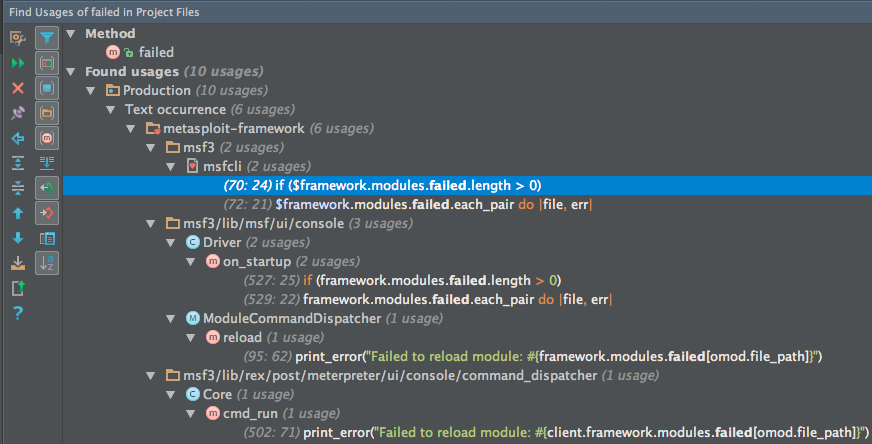
Usage is distributed across the CLI for metasploit-framework, so #failed should remain directly accessible on Msf::ModuleManager to preserve the framework.modules.failed interface.
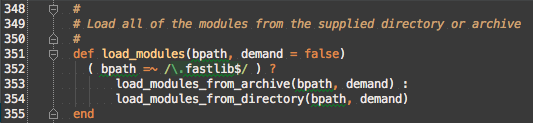
#load_modules is the point where the code forks either into the archive or directory loading, so although #load_modules should remain Msf::ModuleManager::Loading, it needs to be rewritten to use instance of Msf::Modules::Loader::Archive and Msf::Modules::Loader::Directory. #load_modules is also a form of delegating, so to make that more obvious, there should be a method on Msf::Modules::Loader::Base#load_modules that is specialized in Msf::Modules::Loader::Archive and Msf::Modules::Loader::Directory. .fastlib is the extension for archives, so that’s leaking information from Msf::Modules::Loader::Archive, so we can hide that information by asking each loader if it can handle the bpath. In the end the method will look like this:
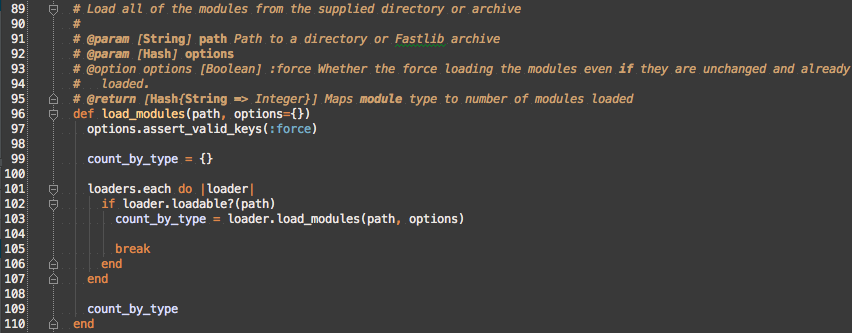
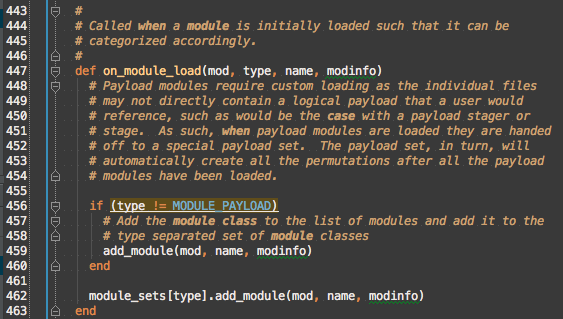
#on_module_load from its name appears to be a primitive callback and only deals with adding modules to either the Msf::ModuleManager or a module set, so it should stay in Msf::ModuleManager::Loading too.
So, we didn’t end up moving any of the common category methods out of Msf::ModuleManager::Loading, but it was still necessary when extracting a new class and it helped spot the #load_modules interface for Msf::Modules::Loader::Base.
Separating Msf::Modules::Loader::Base from Msf::Modules::Loader::Archive and Msf::Modules::Loader::Directory
My general approach for extracting superclasses is write the first class and then start writing the second class with all the copy and paste until you start spotting the redundances that can be pulled out into specialization in the subclasses. I’ll start this process by following the call graph from Msf::ModuleManager::Loading#load_modules into the #load_modules for each loader.
#load_modules
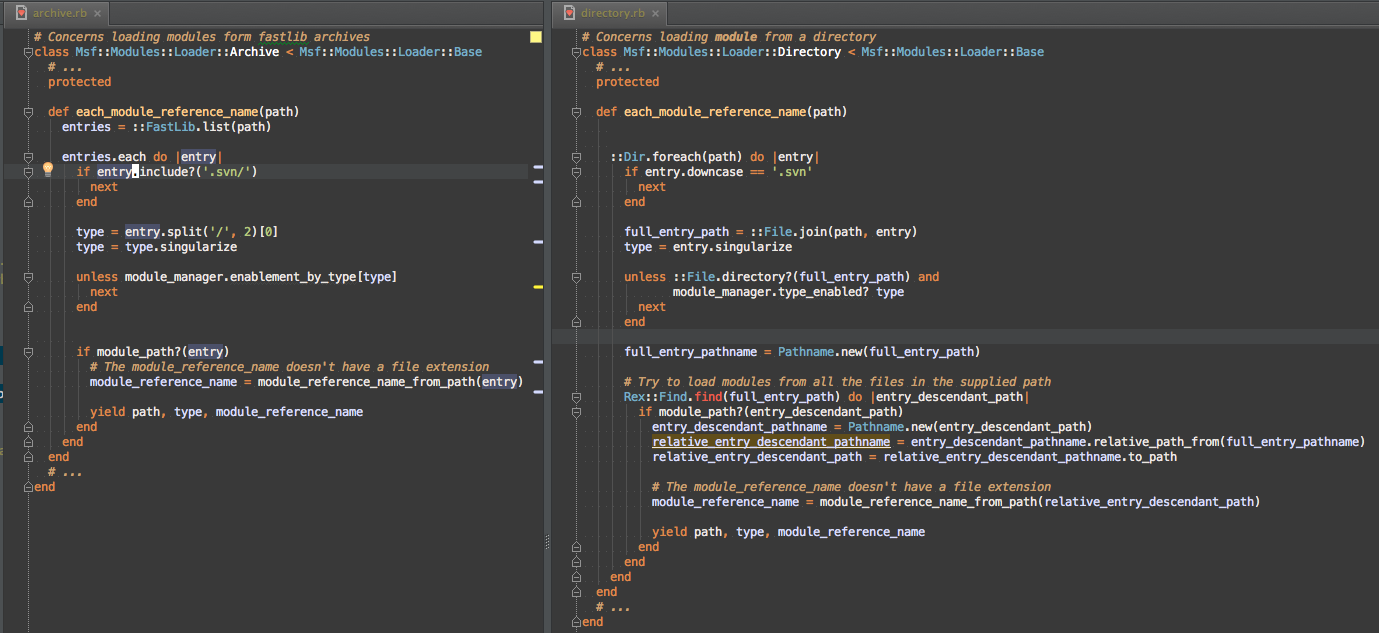
Msf::Modules::Loader::Archive#load_modules is currently Msf::ModuleManager::Loading#load_modules_from_archive and Msf::Modules::Loader::Directory#load_modules is Msf::ModuleManager::Loading#load_modules_from_file. Using split view, I can visually compare the two methods to find commonality
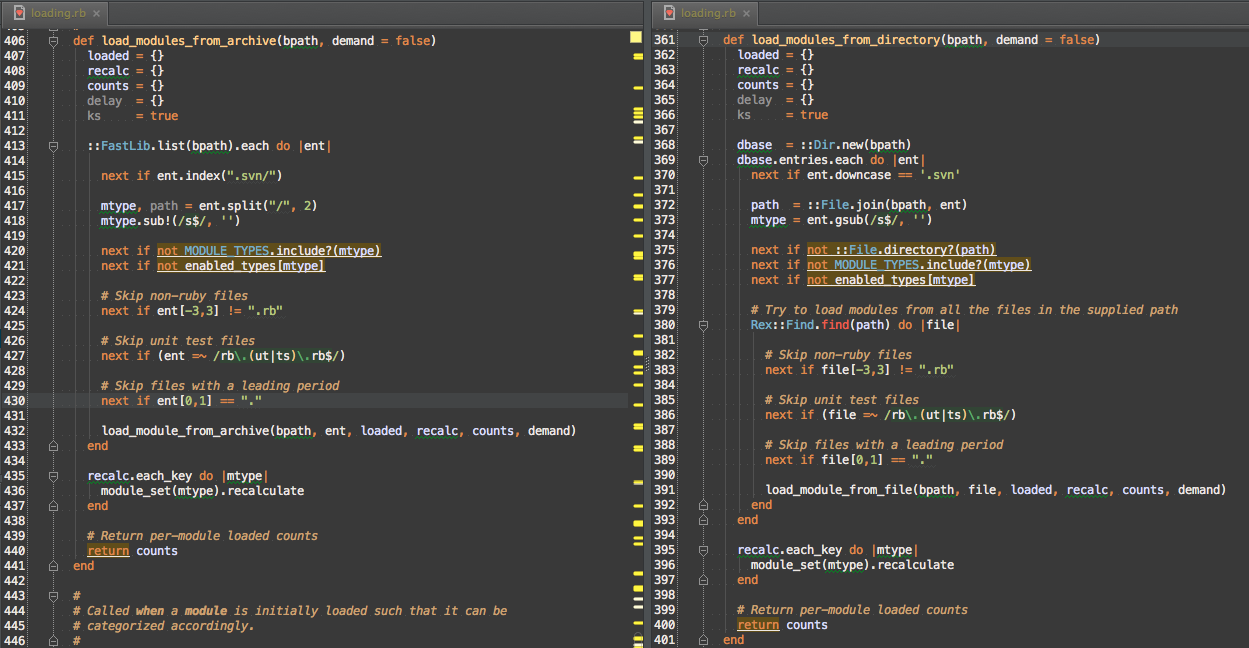
Here’s the common pattern I extracted
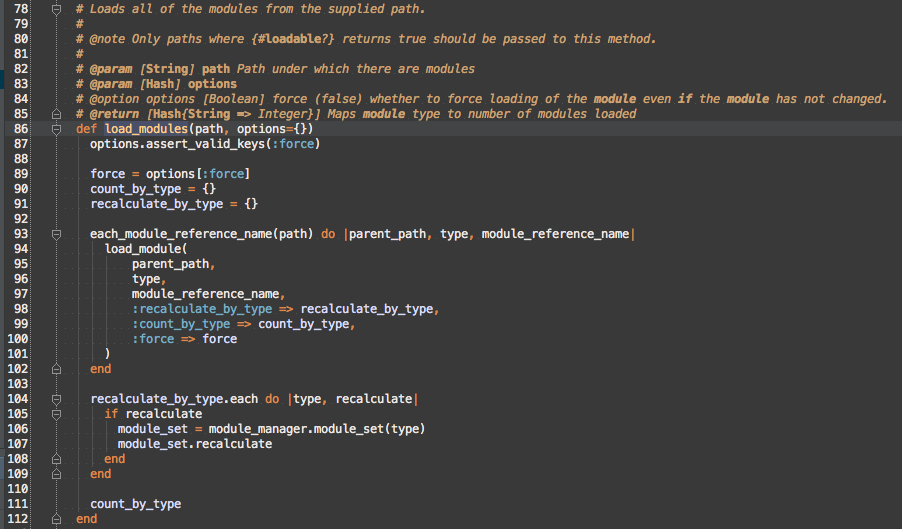
I moved everything before the call to #load_module_from_archive or #load_module_from_file out into #each_module_reference_name, which can deal with the path filters. This allows the common features to be shared. Unfortunately, due to the slight difference between Fastlib’s paths and real filesystem paths, Msf::Modules::Loader::Archive#each_module_reference_name and Msf::Modules::Loader::Directory#each_module_reference_name are still very similar, but to pull out the commonalities would just make the code more confusing to read.
#module_path?
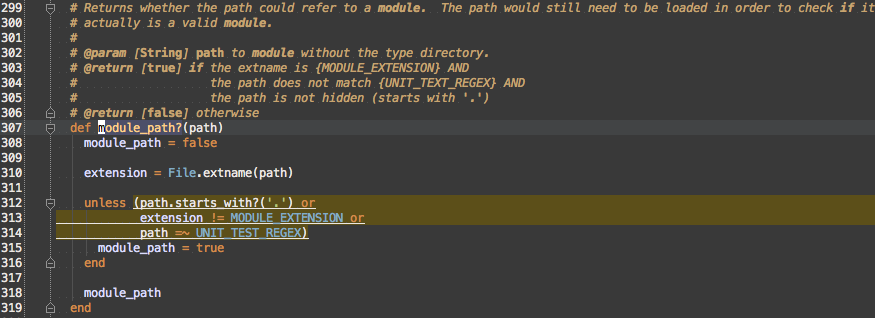
So, this covers the path filtering that was common to #load_modules_from_archive and #load_modules_from_directory:
- Hidden files
- Non-.rb files
- Unit test files
You’ll note I followed best practices by pulling literal strings and Regexp into constants.
#module_reference_name_from_path
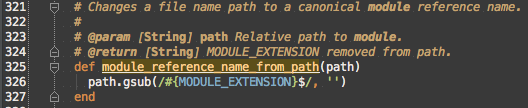
This just strips the file extension from the path, but having a named method is clearer intent than using the gsub inline and also allows for sharing between the subclasses.
#load_module
Jumping out of #each_module_reference_name into #load_modules, each yielded [parent_path, type, module_reference_name] is passed to #load_module
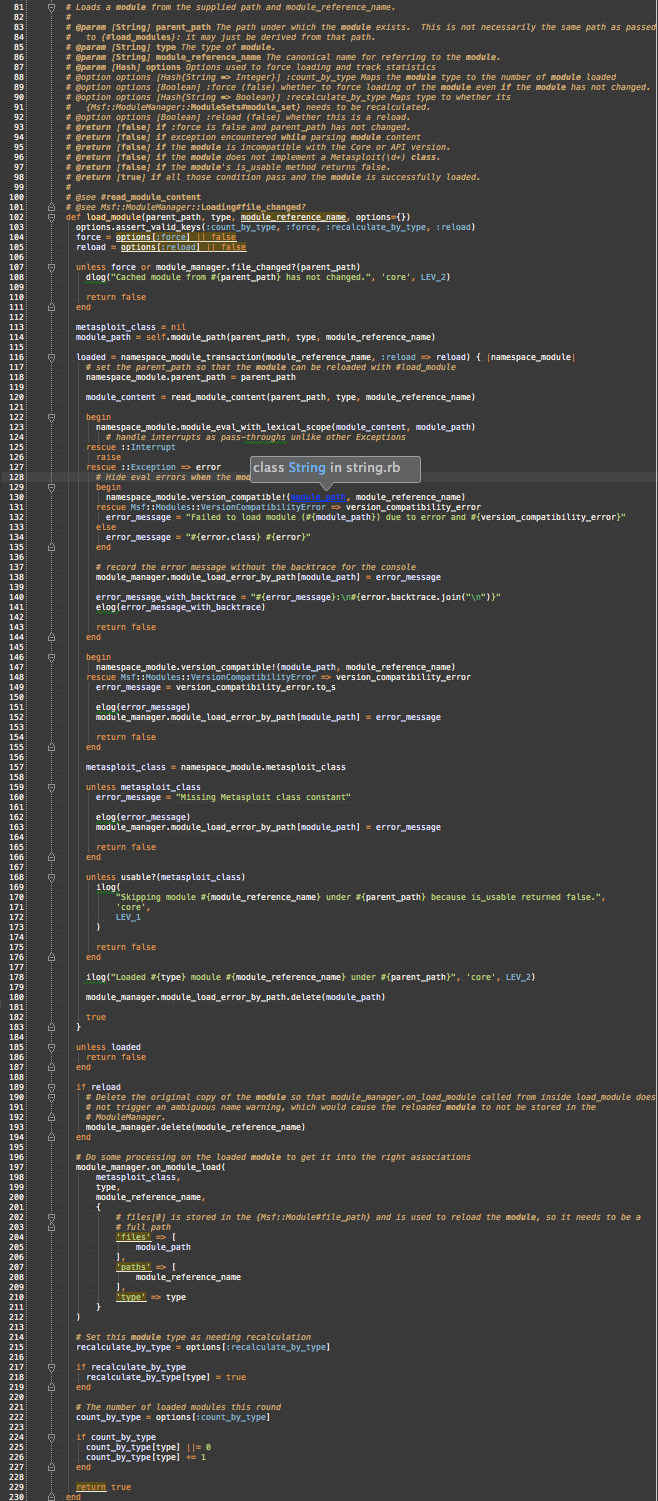
So, it’s still huge (~130 lines), but the commonality between archive and directory is shared and the differences are extracted to #module_path, #namespace_module_transaction, and #read_module_content.
#module_path

#module_path has to handle that the path to a .fastlib archive and a path inside the .fastlib are indicated differently.
#read_module_content

This method abstracts over the difference between reading from a .fastlib and a normal file.
#namespace_module_transaction
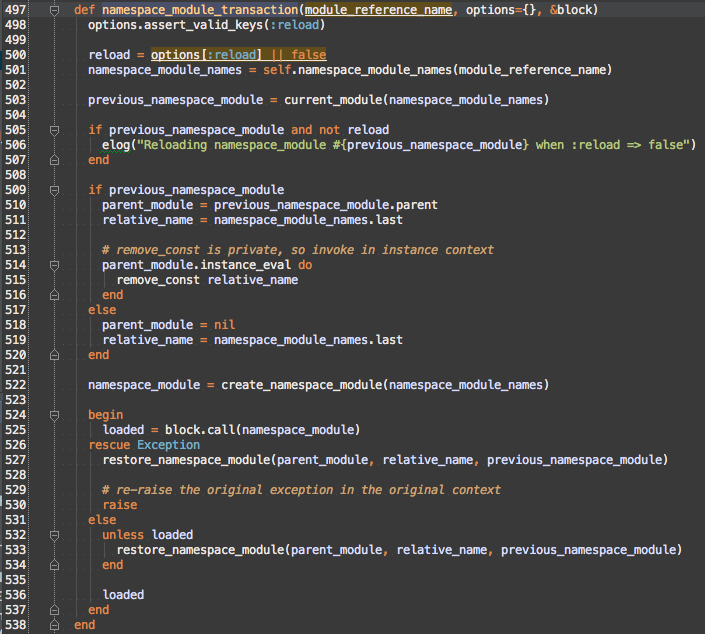
Reloading a module can fail due to any Exception being encountered when evaluating the new source. If an exception occurs, then the original version of the Metasploit Module Class or Module should be restored. Removing the current namespace module, generating a new namespace module, and restoring the old namespace module on exception is handled by #namespace_module_transaction.
#current_module
wrapper_module’s constant lookup is moved to #current_module
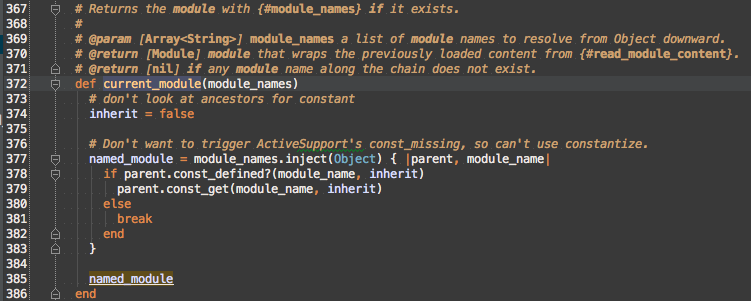
Enumerable#inject works by taking the yieldreturn from the block and passing it as parent to the next iteration of the block along with the next module_name from module_names. If any module along the path is not defined, then break is called, which causes inject to terminate early and return nil instead of the current value of the block or the last parent.
When refactoring introduces you to lexical scope
wrapper_module’s Module creation was extracted to #create_module_namespace and the built-in Module#module_eval was replaced with module_eval_with_lexical_scope.

The reason for this is that refactoring into new modules and classes actually introduced a bug: the Msf module was lost from the lexical scope. The loss of Msf in the lexical scope is an issue because there are modules (like auxiliary/dos/ssl/dtls_changecipherspec) that didn’t fully qualify their constants.
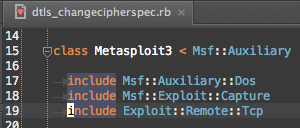
There is no top-level Exploit::Remote::Tcp, but there is a Msf::Exploit::Remote::Tcp, so how is include Exploit::Remote::Tcp finding Msf::Exploit::Remote::Tcp?
Constant look-up in Ruby
This is a slight digression to explain constant lookup in Ruby. The following rules are applied in order:
- Look at the lexically scoped constants
- Look at the ancestors of the current
ModuleorClass
The tricky part is what counts as the lexical scope. It turns out that the lexical scope is not as simple as listing the namespace modules.
Constant look-up when loading Metasploit Modules
In the original Msf::ModuleManager that called module_eval, the lexical scope was [Msf::ModuleManager, Msf] because of the nested module declaration.
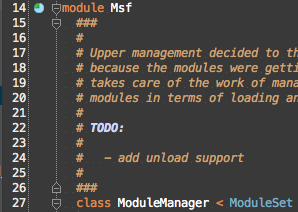
But, because I didn’t want deeply indented code (or for the namespace modules to be defined in more than one file), I went with compact, unnested module declarations during the refactor:
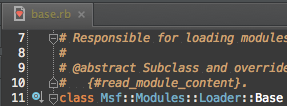
Fixing constant look-up in Msf::Modules::Loader::Base
I could have fixed the constant look-up by just changing to nested modules, but that would have indented all the code 3 more levels and made Msf, Msf::Modules, and Msf::Modules::Loader be defined in multiple files, and more likely to be loaded partially. I also didn’t think it wise that loaded Metasploit Modules were depending on the namespace (Msf) of the code loader, as this namespace could change since the project is called metasploit-framework and so by gem conventions should use the Metasploit::Framework namespace and not Msf. This left me with the need to fake lexical scopes. It turns out it’s really hard to fake lexical scopes using just blocks, so I ended up having to use Strings with module_eval to construct the simulated lexical scope in a string and then call a method, module_eval_with_lexical_scope that was declared in that String, which calls module_eval.
namespace_modules_names
Escaping the module_reference_name was extracted to namespace_module_names.
vs 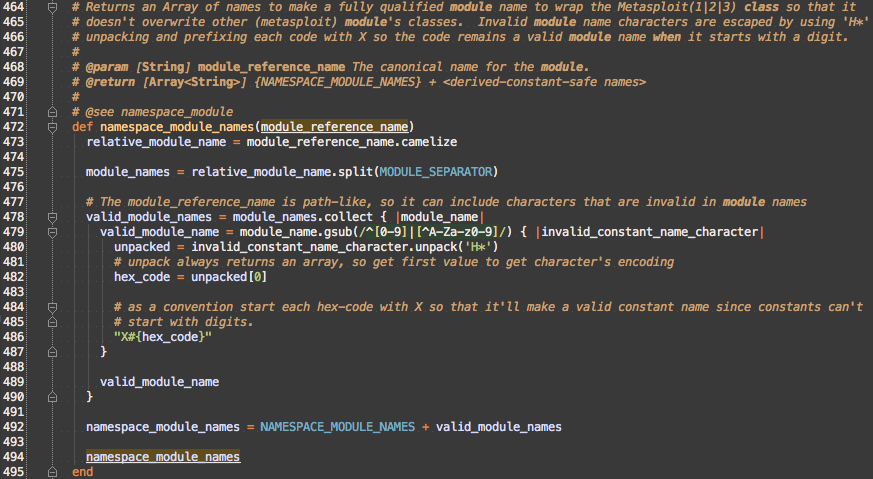
After the escaping, NAMESPACE_MODULE_NAMES is prefixed. NAMESPACE_MODULE_NAMES is ['Msf', 'Modules']. The 'Msf' as the first element of the namespace is the key to reintroducing the Msf into the lexical scope.
create_namespace_module
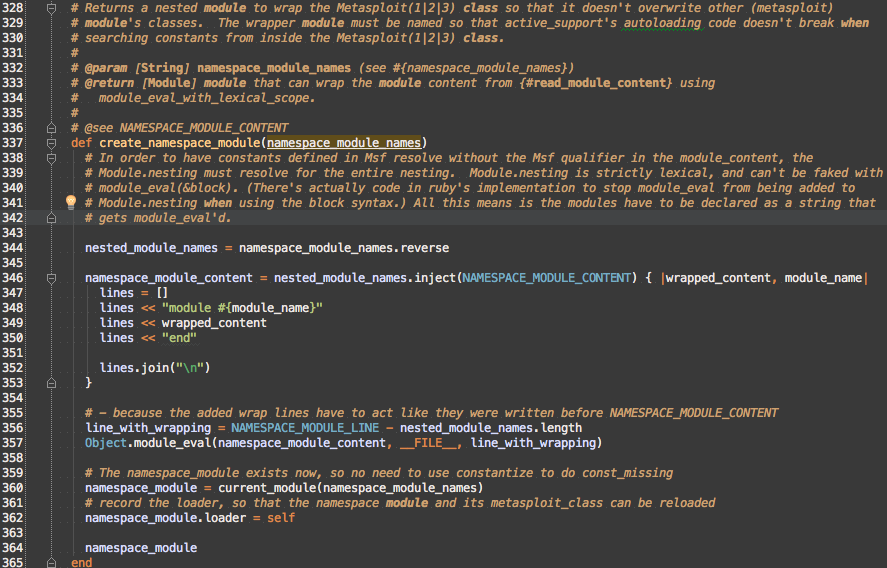
Nesting string Modules
To build up a lexical scope, the code needs to wrap child modules in module Parent ... end blocks. Instead of having to prepend module Parent to the front of a string and append end to the end of the a string, I reverse the namespace_module_names so I can build the inner modules first and then wrap them with the parent module like Russian nesting dolls.
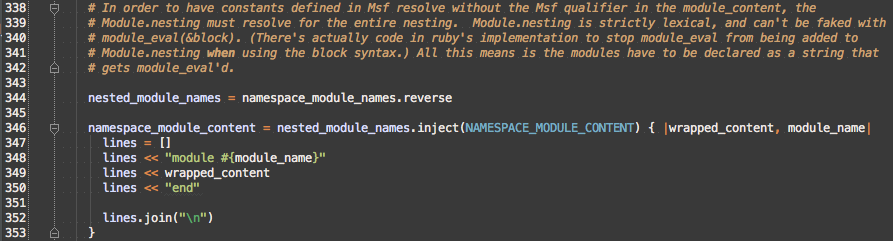
To make nicer backtrace and allow for easier debugging, the code evaluates namespace_module_content by giving it’s path as the current file and it’s starting line as the first line of NAMESPACE_MODULE_CONTENT, but it needs to be adjusted for all the outer namespaces.

With the path and line correct we get the neat power to put break points in body of the NAMESPACE_MODULE_CONTENT string:
Review
So, with this final version of the Metasploit Module loader, the Metasploit Pro’s prosvc was able to use ActiveSupport::Dependencies.autoload_paths to load the same code as Metasploit Pro UI. Loaded Metasploit Modules have assigned namespace names and the entire loading process is debuggable. Let’s review what we’ve covered.
- There are 3 ways to load entire files in the Ruby standard library:
- There are 2 ways to load entire files in ActiveSupport:
Module.newcreates anonymous modules- They get a
Module#namewhen a constant is set to theModule - They break
ActiveSupport::Dependencies’sconst_missing
- They get a
- When files are too big they can be broken up
- Ensure there is one
ClassorModuleper file - Group related methods into
includedModules - Break up hierarchies of methods into
Classhierarchies
- Ensure there is one
- Parts of files or entire files can be loaded by
module_evalmodule_evalcaptures the lexical scope only with String
- Lexical scope influences constant look-up
- Nesting
moduledeclaration has a different lexical scope than::separated names - The lexical scope can be retrieved with
Module.new
- Nesting
- Passing the path and line to
module_evalallows debugging in string code.
Acknowledgements
I’d like to thank James “egypt” Lee for imparting his knowledge of how to use the various msfconsole commands to ensure my changes didn’t break anything, fixing my lambda vs proc bug, and Ruby 1.8-incompatibility. I’d like to thank Samuel “Shuckins” Huckins for testing these changes against Metasploit Pro. I’d like to thank HD Moore for spotting when I missed automatic namespace names colliding with real Modules. I’d like to thank Trevor Rosen for allowing me to spend weeks to fix this the right way. I’d like to thank Regina Imhoff for reviewing this article and accompanying presentation.
Links
- Article
- Presentation